
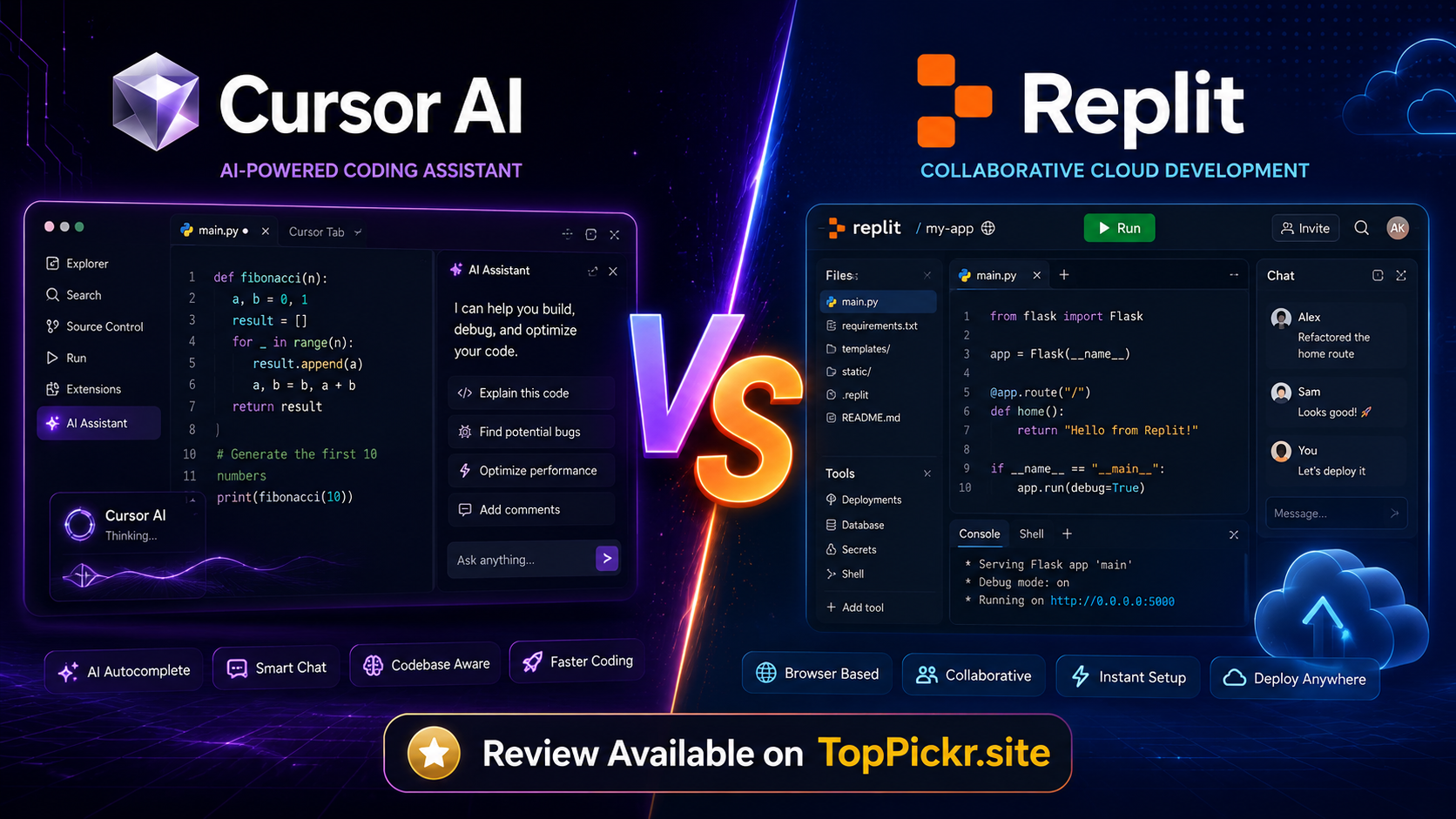
Introduction To Cursor And Replit
Here’s the thing: the cursor ai vs replit debate is no longer just a comparison of two coding tools. It’s become a real decision for beginners, students, freelancers, startup founders and solo developers who want to build faster with AI. These tools and the complete guide are available on TopPickr to help you select the right one before you waste your time, money or energy on the wrong platform.
Imagine this: You have an idea for a website, SaaS product, AI tool, school project, ecommerce store, or Fiverr client project, but you don’t want to spend weeks setting up environments, fixing errors, or searching Stack Overflow. Cursor AI and Replit both promise to make coding easier, but they’re solving different problems. Cursor is working on making your coding workflow smarter inside an editor. Replit is working to help you build, run, collaborate and publish apps directly from your browser.
Now pay attention, if you are looking for cursor ai vs replit for beginners the answer depends on how you want to work. If you’re after a powerful AI coding editor for serious development, consider Cursor AI. Replit is easier if you want to start from an idea, publish a working app without a complex setup. That’s why this cursor ai vs replit review explains the difference clearly, simply and practically.
Before you decide, visit TopPickr.site for more AI tool reviews, comparisons, and beginner-friendly guides. You can also read this related AI comparison on TopPickr: Claude AI Review: Better Than ChatGPT in 2026?.
<h2>Cursor AI vs Replit Difference Explained
Its a straightforward difference: Cursor AI is an AI-enabled code editor, whereas Replit is an online platform for coding and creating apps. That one sentence covers most of the cursor ai vs replit difference for beginners.
Think of Cursor as a smart coding assistant within a professional editor. It helps you write and understand code, refactor functions, fix bugs, and work across a codebase. “This can be especially useful if you already have a project, a GitHub repo, or a local development workflow.
Replit is a building environment in your browser. It provides coding, hosting, preview, collaboration, AI assistance and deployment all in one place. This can be especially handy if you want to make and share something quickly without having to install software on your computer.
Here’s the quick answer to cursor ai vs replit which is better: Cursor AI is better for developers who want more control over code, while Replit is better for people who want a faster start, easier collaboration, and simpler publishing.
What Cursor Ai Actually Is?
Here’s the big thing: Cursor AI is an AI-first code editor built for those who want to write, edit and improve code faster. Developers are familiar with the modern editor style, and many users compare it to VS Code.
Cursor is all about helping you ask questions about your project, generate code, edit multiple files, fix bugs, and understand complex code faster. Cursor is at its best when the project is already code-heavy. This makes cursor ai vs replit for coding projects a hot topic.
Cursor AI is great for web developers using JavaScript, TypeScript, React, Next.js, Python, Node.js, and many popular frameworks. This is why cursor ai vs replit for web development is often a question of local editor vs workspace in the browser.
For serious coders, Cursor feels powerful because it can work with your files and help you improve your code piece by piece. If you are asking if “ cursor ai is better than replit ” the answer is yes for local development, advanced editing, codebase understanding, refactoring and professional coding workflows.
Best Cursor AI Users
Smart developers should choose Cursor AI if they already understand basic coding, want AI help inside a real editor, need better code suggestions, or want to build larger apps with more control. Cursor AI is also a strong choice for solo developers, startups, and freelancers who need speed but still want ownership of the development process.
What Replit Ai Actually Is ?
Here’s the simplest explanation: Replit AI is integrated into Replit’s online development platform and helps users to create, explain, test, fix and publish apps from the browser. You don’t need a big laptop setup, local server setup or complicated development environment to get started.
What I love about Replit is that it’s one spot to code, preview, collaborate and deploy. This makes cursor ai vs replit for students a big comparison as students often need something fast, simple and accessible from school computers, shared laptops or low spec devices.
Replit is also good for no-code and low code users. For no code users, if you search cursor ai vs replit, Replit might seem less intimidating because its AI app builder can take plain language ideas and help turn them into working software.
For those asking “is replit better than cursor ai,” the answer is yes if your priority is browser-based building, quick sharing, team collaboration, or simple deployment. Replit is not just an editor, it is more like a full build-and-publish workspace.
Best Replit Users
Busy beginners should choose Replit if they want to build websites, apps, dashboards, prototypes, school projects, or simple SaaS tools without installing a full local development setup. It is especially helpful for quick experiments and learning coding by doing.
Pricing= Cursor And Replit
Here comes the money question! The cursor ai vs replit pricing comparison depends on whether you are paying for AI coding power, hosting convenience, collaboration or app-building credits. Both tools offer free entry points, but paid plans open up for more serious usage.
Cursor offers a free Hobby plan with limited AI usage, an Individual plan starting at $20/month, Teams from $40/month per user, and custom Enterprise plans. Usage limits may change, so please check the official Cursor pricing page before purchasing.
Replit has a free plan, called Starter, and offers a paid plan, called Core, priced at $20/month, billed yearly. There are also Pro ($95/month, billed yearly) and Enterprise plans. Replit plans have varying amounts of monthly credits, collaborators, agents, deployments, and team controls, so always check the official Replit pricing page.
The comparison between cursor ai and replit free plan is straightforward. Both are useful for testing but neither free plan is ideal for heavy professional usage. If you want to try AI-assisted editing the free plan from Cursor is better. If you want to try browser-based app creation and publishing a small project the free plan from Replit is better.
Pricing Verdict
Smart buyers should choose Cursor if they want stronger editor-based coding assistance for the monthly price. Practical builders should choose Replit if they value hosting, collaboration, browser access, and app publishing in the same package.
Pros & Cons
Here’s where the decision becomes easier: both platforms are excellent, but they are excellent in different ways.
| Tool | Pros | Cons |
|---|---|---|
| Cursor AI | Strong AI code editing, local workflow, great for existing projects, useful for refactoring, familiar editor experience | Requires more coding knowledge, local setup may be needed, deployment is not the main feature |
| Replit | Browser-based, easy setup, AI app building, collaboration, preview, hosting, beginner-friendly | Less ideal for complex local workflows, usage credits can matter, advanced control may feel limited |
The cursor ai vs replit pros and cons show that Cursor is better when code quality and editing depth matter. Replit is better when speed, simplicity, and publishing matter.
For cursor ai or replit for coding, choose Cursor when you want to become a stronger developer. Choose Replit when you want to build and share quickly.
Environment: Browser vs Local
Here’s the environment difference: Replit works in the browser, while Cursor works best as a local desktop editor. This matters more than beginners think.
Replit removes setup friction. You can open a browser, create a project, use AI, preview your work, collaborate, and publish. That makes replit vs cursor ai for learning coding a strong win for Replit, especially for beginners who hate setup errors.
Cursor gives more control. You can work with local files, terminals, Git repositories, frameworks, extensions, and advanced development workflows. That makes cursor ai vs replit for solo developers a strong win for Cursor when the developer wants serious control.
For Pakistani users, browser-based access can be helpful when working from shared computers or lower-end devices. That is why cursor ai vs replit Pakistan and cursor ai vs replit for Pakistani students are important search topics for TopPickr readers.
AI Capabilities: App Building vs Code Editing
Here is the real AI difference: Replit AI helps you build apps Cursor AI helps you edit better They both use AI, but for different jobs.
Replit is more like an AI based app builder. Tell it what you want . It can help you plan . Create . Test . Publish . This is a strong Replit use case for cursor ai vs replit for AI app builder.
Cursor is more of a coding partner for AI. You pick code . You request edits . You build functions . You debug issues . You improve the project . This makes Cursor perfect for people who want more control over the code changes.
When comparing cursor ai vs replit for app development, choose replit for quick prototypes and choose cursor for more robust engineering. If you’re building a serious product, you might end up using both.
Replit: AI That Builds Apps
Here’s why Replit is a beginner favourite: it minimises the gap between thought and working app. Request a website, dashboard, tool or prototype and try it in the browser.
Replit is great for replit vs cursor ai for website building when you need a quick landing page, portfolio, small business site, or demo app. The platform has preview and publish so you can build faster.
For replit vs cursor ai for mobile app, Replit can help you build mobile-friendly web apps and prototypes. However, developers may still want to use specialised frameworks and local tools for production native mobile apps.
replit vs cursor ai for SaaS project Replit is good for MVPs, demos, early validation. For larger SaaS products with a complex architecture, Cursor can become more useful as the codebase grows.
Replit vs cursor ai for ecommerce website Replit can assist prototype product pages, carts, dashboards and admin panels. Cursor might be better later on when custom logic, integrations and performance tuning matter.
Replit is good for replit vs cursor ai for ai tools website as you can easily make a frontend, connect APIs and publish a shareable version. This is useful for TopPickr readers who want to start AI tool directories, review sites, or micro SaaS projects.
Cursor: AI That Enhances Your Editing
That’s why developers love Cursor: it doesn’t just generate from a prompt – it helps you think through code. Files are explainable, edits are suggestable, logic is refactorable and bugs are solvable in a coding workflow.
If you are building scripts, automation tools, data projects, backend APIs or AI workflows then Cursor is great. Cursor ai vs replit for python coding Replit is more convenient for quick in-browser python experiments.
For cursor ai vs replit for javascript Cursor is great for real javascript and typescript development, especially with modern frameworks. Replit is better if you want to test and share fast.
Cursor is better for structured React projects, larger components, state management, and long-term maintenance. For cursor ai vs replit for react apps, Replit is better for quick React demos, prototypes, and for beginners to practise.
Cursor enables technical founders to go faster in real projects, and Replit helps non-technical founders validate ideas faster. Cursor ai vs replit for startups
Language and Framework Support
Here’s the good news: both tools support popular languages and frameworks. The better choice depends on workflow, not just language support.
Cursor works well when your project uses common developer stacks like Python, JavaScript, TypeScript, React, Node.js, Next.js, and modern backend tools. It becomes more valuable when your codebase has many files and you need AI help understanding context.
Replit works well when you want a ready-to-use environment for many languages, quick experiments, web apps, dashboards, and prototypes. Its browser-first approach makes it beginner-friendly.
For cursor ai vs replit for web development, Replit wins for easy start and publishing, while Cursor wins for advanced editing and project control. For cursor ai or replit for making websites, Replit is better for quick websites, and Cursor is better for polished custom development.
Collaboration Features
Here’s a major difference: Replit has collaboration built into the platform, while Cursor is more focused on individual and team coding workflows through editor-based development.
Replit is great for school projects, hackathons, classrooms, and teams that want to work in one shared online space. That is why replit vs cursor ai for school projects is often a Replit win.
Cursor can still work well for teams, especially when developers use Git, shared repositories, team rules, and professional workflows. However, it is not as simple as opening a shared browser workspace and inviting someone instantly.
For cursor ai vs replit for students, Replit is usually easier at the start. For students who want to become professional developers, Cursor becomes more valuable after they learn fundamentals.
Deployment
Here’s the reality of publishing: Replit simplifies deployment for beginners. It’s meant to help users build, preview, publish and share apps from one place.
But the cursor is not on deployment as the main selling point. You can still deploy projects built with Cursor to platforms such as Vercel, Netlify, Railway, Render, GitHub Pages or your own server, but you will have to manage that workflow yourself.
This difference is important to freelancers. Replit can help you move fast if a Fiverr buyer needs a quick demo link. If your client wants a clean, maintainable project, Cursor can help you deliver cleaner code.
That is the reason why cursor ai vs replit for freelancing and cursor ai vs replit for Fiverr projects are dependent on the client job. Replit for quick prototypes. Serious development with Cursor.
Strengths and Weaknesses Side by Side
Here’s the fastest way to compare them side by side.
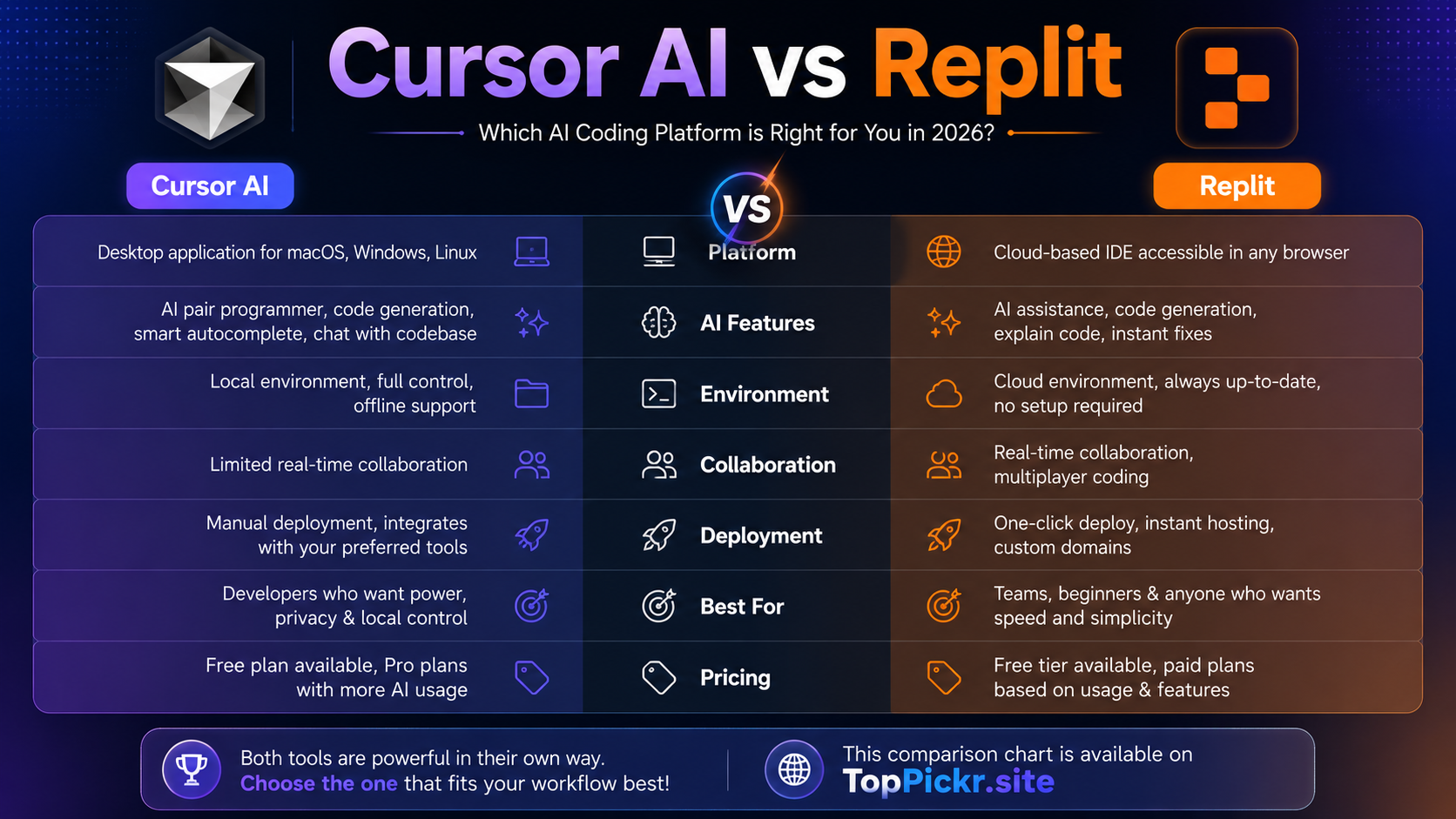
| Category | Cursor AI | Replit |
| Best for | Code editing and serious development | Browser app building and quick publishing |
| Beginner setup | Medium | Easy |
| AI strength | Editing, refactoring, codebase help | App creation, planning, publishing |
| Local workflow | Strong | Limited |
| Browser workflow | Not main focus | Strong |
| Collaboration | Good for dev teams | Very beginner-friendly |
| Deployment | External platforms needed | Built-in publishing options |
| Best user | Developer, freelancer, startup engineer | Beginner, student, prototype builder |
The cursor ai vs replit 2026 comparison shows that no single tool wins every category. Cursor wins as a smarter editor. Replit wins as a faster app-building workspace.
Use Case Fit
Here is the publishing reality: Replit simplifies deployment for beginners. It’s designed to help users build, preview, publish and share apps from one place.
The cursor is not focused on deployment as the main selling point. You can still deploy projects built with Cursor to platforms like Vercel, Netlify, Railway, Render, GitHub Pages or your own server, but you will have to manage that workflow yourself.
For freelancers, this distinction is important. Replit can help you move fast if a Fiverr buyer needs a quick demo link. Cursor can help you deliver cleaner code if your client wants a clean, maintainable project.
That is the reason why cursor ai vs replit for freelancing and cursor ai vs replit for Fiverr projects are dependent on the client job. Replit for quick protos. Use Cursor for serious development.
Competitor Comparison: Cursor AI, Replit, and Other AI Coding Tools
Here’s the bigger market view: Cursor and Replit are not alone. Developers also compare cursor ai vs replit vs github copilot, cursor ai vs replit vs bolt, cursor ai vs replit vs lovable, cursor ai vs replit vs claude code, cursor ai vs replit vs windsurf, and cursor ai vs replit vs vscode.
GitHub Copilot is strong for developers already inside GitHub and VS Code. Bolt and Lovable are popular for fast AI app generation. Claude Code is useful for agentic coding workflows. Windsurf is another AI coding environment. VS Code remains the classic editor many developers still love.
The best choice is not always the most viral tool. The best choice is the tool that fits your skill level, budget, device, project type, and delivery deadline.
External links for further checking: Cursor Official Website, Cursor Pricing, Replit Official Website, Replit Pricing, Replit Agent Docs, and GitHub Copilot.
Regional Search Intent: Urdu, Hindi, Pakistan, and Students
Why does this matter for South Asian readers? Many beginners search in English, but think in Urdu or Hindi. This guide is also useful for people looking for replit vs cursor ai for beginners in Urdu, cursor ai vs replit in Hindi, cursor ai vs replit in Urdu.
The best tool for Pakistan depends on the speed of the internet, the payment method, the quality of the device and the learning goals. You might want to use Replit for quick browser projects, and Cursor if you’re serious about freelancing.
Replit is a great tool for students in Pakistan to learn coding, test ideas and complete school projects. Cursor is great when students want to move from beginner practice to real development.
That’s why the topic of cursor ai vs replit for Pakistani students doesn’t have one answer. It is suitable for beginners to start with Replit and add Cursor when they want to write cleaner codes and handle bigger projects.
What If You Need Both?
Here’s the smartest strategy: you do not always need to choose only one. Many builders can use Replit and Cursor together.
Start in Replit when you want to test an idea fast. Build the first version, preview the result, and check whether the app idea is useful. Then move the code into Cursor when you want deeper editing, cleaner architecture, better refactoring, and more professional development.
This workflow is powerful for freelancers, startups, and AI tool builders. Replit helps you move from idea to demo, while Cursor helps you move from demo to serious product.
If you are building an AI tools website, a SaaS dashboard, a React app, a Python automation tool, or a client project, using both can save time. Replit gives speed. Cursor gives control.
Final Verdict
Here’s the final answer: Cursor AI is better for developers who want a powerful AI code editor, while Replit is better for beginners who want a browser-based app builder with simple publishing.
Choose Cursor AI if you care about code editing, refactoring, local projects, larger codebases, and professional workflows. Choose Replit if you care about quick setup, browser access, collaboration, app generation, and easy deployment.
The cursor ai vs replit comparison is not about which tool is universally better. It is about which tool is better for your next project. If your goal is to learn coding, build school projects, create quick websites, or test an idea, Replit is a great place to start. If your goal is to become a stronger developer, build serious apps, or improve existing projects, Cursor AI is a better long-term companion.
For more AI tool reviews and comparisons, visit TopPickr.site. These tools are available on TopPickr, and the right choice can help you build faster, learn smarter, and deliver better projects in 2026.
Frequently Asked Questions
Is Cursor AI better than Replit?
Here’s the practical answer: Cursor AI is better for serious code editing, local development, refactoring, and working with bigger projects. Replit is better for browser-based building, quick prototypes, collaboration, and easy publishing.
Is Replit better than Cursor AI?
Here’s the beginner-friendly answer: Replit is better if you want to start building without installing software. It is especially useful for students, beginners, and no-code users who want to turn ideas into working apps quickly.
Cursor AI or Replit for coding?
Here’s the clear choice: use Cursor AI for deeper coding work and Replit for quick online coding. If you want to improve as a developer, Cursor is stronger. If you want to build and share fast, Replit is easier.
Cursor AI or Replit for beginners?
Here’s the simplest advice: Replit is usually easier for complete beginners because it runs in the browser and reduces setup problems. Cursor is better once you understand basic coding and want stronger AI editing support.
Which is better for web development?
Here’s the balanced answer: Replit is better for quick websites and prototypes, while Cursor is better for custom web development, React apps, Next.js projects, and long-term code quality.
Which is better for app development?
Here’s the smart answer: Replit is better for fast MVPs and demos. Cursor is better when you need more control, cleaner code, and a serious development workflow.
Which is better for students?
Here’s the student-focused answer: Replit is better for learning, school projects, and quick experiments. Cursor is better for students who already know basic coding and want to build portfolio-level projects.
Which is better for freelancers?
Here’s the freelancing answer: Replit is great for quick Fiverr demos and prototypes. Cursor is better for professional client work that needs clean code, debugging, and maintainability.
Can I use Cursor AI and Replit together?
Here’s the best workflow: yes, you can start in Replit for fast app creation and then use Cursor to improve, refactor, and scale the code. This gives you both speed and control.
What is the best alternative to Cursor AI and Replit?
Here’s the broader answer: GitHub Copilot, Bolt, Lovable, Claude Code, Windsurf, and VS Code are common alternatives. The best option depends on whether you need AI editing, app generation, deployment, or collaboration.