
Introduction
Imagine taking a rough idea for a business and turning it into a working website or web app without needing to hire a developer, learn code, or spend weeks inside complicated software. That’s why this Hostinger Horizons review is important for 2026, especially for beginners, freelancers, creators, small businesses and startup founders who want to build faster without technical stress.
The real question that most users ask themselves before paying is: is Hostinger Horizons good enough to create a serious project or is it just another AI tool with big promises and limited results? This guide answers that question clearly, honestly and practically so you can decide if it fits your budget, workflow and business goals.
Let’s get one thing straight with you right from the start – Hostinger Horizons is NOT your average drag and drop website builder. It’s more like a partner in building AI apps. You tell the platform what you want and it creates the structure, the code, the design, the logic for the app, and then you can fine tune it with prompts.
For readers comparing tools before buying, these reviews are available on TopPickr.site to help you make smarter software decisions. You can also explore more AI tool comparisons on TopPickr.site, including the detailed guide on Cursor AI vs Replit and the latest Claude AI Review: Better Than ChatGPT in 2026?.
By the end of this Hostinger Horizons honest review, you will know its features, pricing, pros and cons, limitations, best use cases, alternatives, prompt examples, and whether Hostinger Horizons is worth it for your next project.
What is Hostinger Horizons?
Think of Hostinger Horizons as an AI-powered no-code app builder that turns natural language commands into real web pages and web apps. You start by writing what you want the app to do, not by starting with templates, menus, plugins, and manual setup.
In plain English, Hostinger Horizons is a tool that helps you create a website with Hostinger Horizons by asking the AI for pages, dashboards, forms, login systems, landing pages, ecommerce layouts, booking flows, and business tools. The platform then builds the project and allows you to enhance it with further instructions.
Speed is the biggest draw for beginners. You don’t need to know about hosting, deployment, frontend frameworks, backend setup, or database structure before building out the first version of your idea.
The biggest plus for entrepreneurs: simplicity. You can describe your idea in plain English, preview how it works, ask for changes, and publish your project without having to switch between five different tools.
For developers it’s a different story. Hostinger Horizons will help you build quick prototypes, MVPs, and first drafts of web app ideas, but more experienced developers may still prefer tools that give them more control over the code.
Key Features
The strongest Hostinger Horizons features focus on reducing the gap between idea and launch. The platform brings AI prompting, app generation, hosting, editing, testing, and publishing into one workflow.
AI Website and App Generation
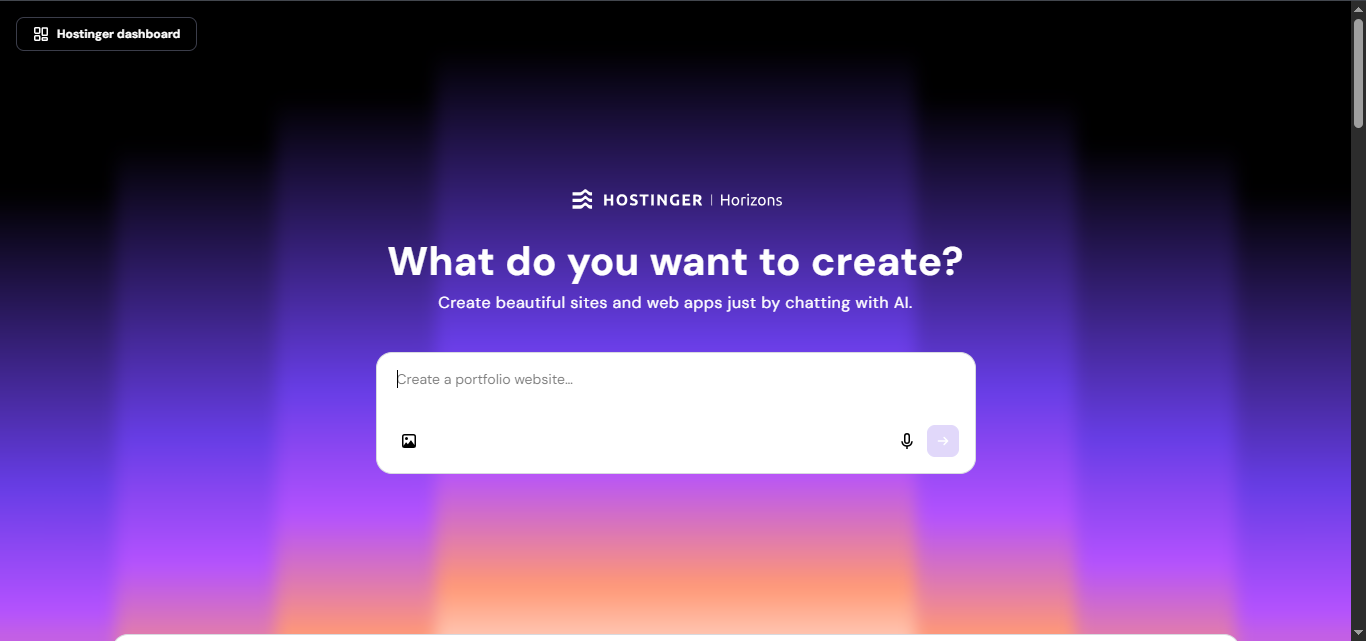
The first big feature is AI generation from prompts. You can ask the tool to create a startup landing page, fitness tracker, CRM dashboard, restaurant booking system, portfolio website, or a simple SaaS-style web app.
Hostinger horizons ai website builder is an apt phrase for the platform as it can build websites from text instructions. At the same time, phrase hostinger horizons ai app builder is also accurate because it goes beyond static pages and can build interactive web app experiences.
No-Code Building Experience
The second major feature is the no-code workflow. Hostinger Horizons no code app builder features are useful for people who want to create online tools without touching HTML, CSS, JavaScript, React, or backend code.
The platform is especially helpful when you know what you want but do not know how to build it technically. You can say, “Create a lead generation landing page with a pricing section, FAQ, contact form, and modern SaaS design,” and then refine the output step by step.
Built-In Hosting and Publishing
The third major benefit is built-in hosting. Many AI coding tools can generate code, but users still need to deploy that code somewhere else. Hostinger Horizons reduces that friction by connecting creation and hosting in one place.
This matters for beginners because deployment often becomes the hardest part of launching an app. With Horizons, you can move from idea to preview to published website without managing servers manually.
Visual Inputs, Voice, and Multilingual Prompts
Another useful feature is flexible input. Depending on your plan, you can use text, images, screenshots, or voice prompts to explain your idea more clearly.
This is powerful for design-heavy projects. For example, you can upload a screenshot of a layout you like and ask the AI to create a similar structure for your brand, while keeping your own copy, colors, and sections unique.
SEO and GEO Support
A smart advantage is that Hostinger Horizons seo features are built around modern discoverability. The platform supports SEO-friendly projects and also mentions AI-search visibility, which matters as people increasingly discover websites through AI tools, not only traditional Google results.
However, SEO still needs human strategy. You must write helpful content, optimize titles, use proper headings, add internal links, compress images, answer search intent, and update the page regularly.
Hostinger Horizons Prices & Plans – 2026
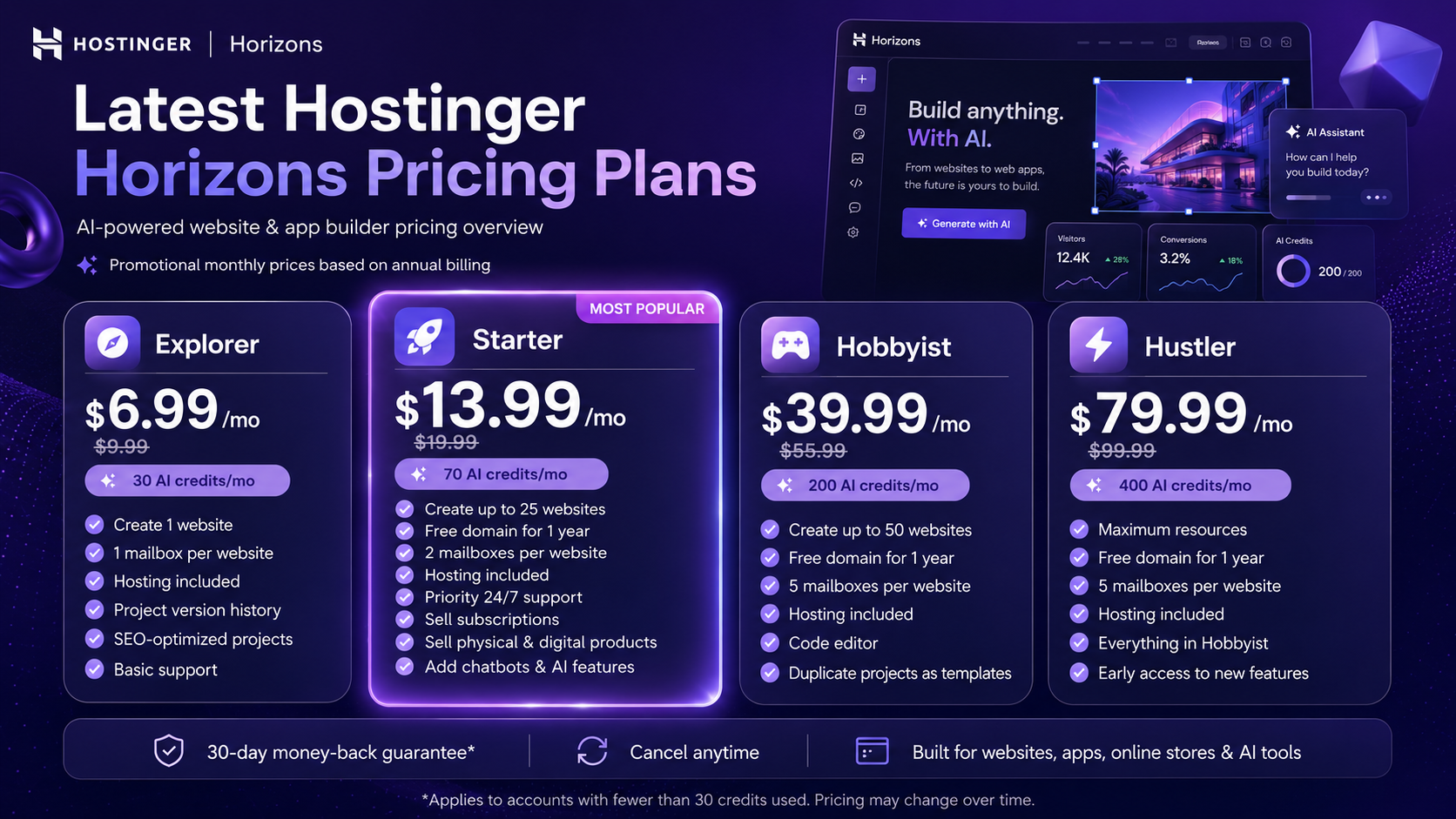
Pricing is one of the most important parts of this Hostinger Horizons pricing review because AI app builders can become expensive if credits run out quickly. Hostinger currently structures Horizons around paid plans with monthly AI credits.
Explorer Plan
The Explorer plan works best for testing the platform or building your first small project. It includes a lower monthly credit allowance and is suitable for users who want to create one project and learn how the tool behaves before upgrading.
For beginners, this plan makes sense if you want to test a landing page, small portfolio, or basic web app. It may feel limited if you keep changing your project repeatedly because AI edits consume credits.
Starter Plan
The Starter plan is better for people who want more flexibility. It gives more AI credits, more project capacity, and extra features for business use, making it a stronger choice for freelancers and small business owners.
For most users, Starter may be the practical middle ground. It gives enough room to build, edit, test, and publish without feeling as restricted as the entry-level plan.
Hobbyist Plan
The Hobbyist plan fits creators, makers, and professionals who build multiple projects. It includes more credits and more advanced tools, including code-related flexibility.
For serious builders, this plan becomes useful when you want to create templates, duplicate projects, or manage more than one product idea. It is not necessary for every beginner, but it can be valuable for ongoing work.
Hustler Plan
The Hustler plan targets users who want maximum resources. It is designed for people who build often, test many ideas, or want access to the highest available monthly credit tier.
For agencies, power users, or high-output creators, the plan may save time. For casual users, it may be more than they need.
Pricing Verdict
The honest pricing verdict is simple: Hostinger Horizons can be affordable compared with hiring a developer, but it is not automatically cheap if your app needs many revisions. You should plan your prompts carefully, use the preview wisely, and avoid wasting credits on vague instructions.
Pros & Cons
Every tool has strengths and weaknesses, and a balanced Hostinger Horizons pros and cons section helps users avoid disappointment. Horizons is exciting, but it is not perfect for every project.
Pros
The biggest pro is speed. You can create a working first version much faster than using traditional development methods.
The second pro is beginner-friendliness. A non-technical user can describe an idea and get something usable without learning a full tech stack.
The third pro is built-in hosting. You do not need separate deployment tools to publish basic projects.
The fourth pro is iteration. You can ask for changes in plain language instead of manually editing every section.
The fifth pro is business usefulness. Hostinger Horizons for ecommerce website projects, landing pages, portfolios, forms, dashboards, and simple business apps can be very helpful.
Cons
The biggest con is credit management. If you use vague prompts, ask for repeated redesigns, or troubleshoot too often, credits can disappear faster than expected.
The second con is limited control compared with professional coding. Advanced developers may want deeper access, custom architecture, or full backend control.
The third con is that AI output still needs review. You should test buttons, forms, links, payment flows, responsiveness, SEO settings, and mobile layout before publishing.
The fourth con is that complex apps may still need technical help. If you want a large SaaS platform, advanced security rules, custom APIs, or enterprise workflows, AI alone may not be enough.
What You Get with a Paid Plan
A paid plan offers more than AI prompts. Depending on the tier you select, you will get access to the app builder, hosting and publishing tools, monthly AI credits, project management features and support options.
You also get to build and improve real-life projects. This includes setting up user accounts, logins, data storage, SEO-optimized project structure and in higher plans, more websites, collaboration, visual editing, image or voice prompting, analytics, ecommerce features and code editor access.
The main thing to understand is that AI credits work like your building fuel. The cost of each serious change, new generation or AI-assisted edit could be a credit charge depending on complexity.
If you already know what you want to do, the paid plan is best. The more you bring in (a clear idea, good copy, brand colours, page structure, and required features), the more you will get out of each credit.
Ease of Use & User Experience
The user experience is one of the strongest reasons people search for a Hostinger Horizons review for beginners. The platform removes many technical steps that usually block non-coders from launching online projects.
The interface feels closer to chatting with a product assistant than managing a traditional website editor. You type what you want, review what appears, and then guide the AI with better instructions.
This workflow helps beginners move fast, but it also requires patience. AI tools perform best when your prompt is specific, structured, and realistic.
Getting Started
It’s easy to get started, as the workflow starts right within Hostinger’s dashboard. You pick Hostinger Horizons, describe the project, and ask the AI to create the first version.
A good initial prompt should include the type of project, the audience, main features, design style, the tone of the brand, pages required and the business goal. A good prompt, for example, is better than “Create me a website.”
Here’s a better prompt: “Create a modern landing page for a digital marketing agency based in Pakistan. Add a hero section, services, pricing, testimonial, FAQ, lead form, whatsapp button, SEO friendly headings and clean blue and white design.”
This type of prompt helps the AI understand your direction. It cuts down on wasted edits and results in a better first draft.
The Interface and First Build
The first build is where Hostinger Horizons feels different from classic builders. Instead of dragging blocks manually, you watch the AI create the project structure, pages, content areas, and interactive elements.
The best approach is to treat the first build as a draft, not a final product. Review the layout, check the text, test navigation, and then ask for focused improvements.
For example, do not say, “Make it better.” Say, “Improve the hero section with a stronger headline, add a pricing comparison section, make the call-to-action more visible, and reduce the text in the services section.”
This saves credits and improves results. AI builders respond better to precise requests than broad opinions.
Error Handling and Auto-Fix
Error handling matters because AI-generated apps can still break. A button may not work, a form may fail, a database field may behave incorrectly, or a preview may show an unexpected issue.
Hostinger Horizons includes tools that help users detect and fix many errors. In some cases, the platform can suggest fixes or let you ask the AI to repair the problem.
The smart workflow is simple: test every feature inside the preview, click every button, submit test forms, check mobile layout, and fix issues before publishing.
For bigger errors, give the AI technical context. Instead of saying, “It is broken,” explain exactly what happened: “When I click the submit button on the contact form, nothing happens. Please fix the form submission and show a success message.”
This makes auto-fix more useful and reduces repeated failed attempts.
The Preview Panel Is Actually a Working App
One of the best UX details is that the preview panel behaves like a working app, not just a static screenshot. You can interact with buttons, menus, toggles, forms, and generated features before publishing.
This helps beginners understand what they are building. Instead of guessing how the final website will behave, you can test the actual experience during the editing process.
The preview is especially useful for web apps. If you build a calculator, booking system, dashboard, quiz, tracker, or internal tool, you can test the flow before making it public.
Still, preview testing is not optional. You should check desktop and mobile views, form behavior, page speed, copy accuracy, and SEO basics before launching.
Final Verdict on UX
The final verdict on UX is positive for beginners and small teams. Hostinger Horizons makes the building process feel simple, fast, and less intimidating than traditional web development.
However, the UX works best when users understand prompt strategy. If you provide lazy prompts, you may get generic results. If you provide detailed prompts, you can get much better results.
Overall, Hostinger Horizons is easy to use, but not magic. It rewards clear thinking, good instructions, testing, and careful editing.
What can you build with Hostinger Horizons?
The practical answer is that you can build many browser-based websites and web apps. This includes business websites, landing pages, portfolios, ecommerce stores, booking systems, dashboards, simple CRMs, calculators, directories, lead generation pages, and MVPs.
Landing Pages
Hostinger Horizons for landing page projects is one of the safest use cases. Landing pages need strong copy, clear sections, fast publishing, mobile design, and lead capture, which fit the platform well.
A good landing page prompt should include the offer, audience, pain point, call-to-action, trust signals, FAQ, and brand style.
Ecommerce Websites
Hostinger Horizons for ecommerce website projects can help small sellers launch faster. It can create product sections, store layouts, checkout-related pages, shipping information, and promotional pages.
However, ecommerce users should test everything carefully. Product data, taxes, payment settings, inventory, delivery details, and policy pages need human review.
Web Apps and MVPs
The phrase hostinger horizons alternative for web apps appears often because users compare Horizons with AI coding platforms. Horizons can help build simple web apps and MVPs, especially when the goal is a working browser-based prototype.
If you want to know how to build app with Hostinger Horizons, start small. Build one core feature first, test it, then add extra features gradually.
Small Business Tools
Small businesses can use Horizons for lead forms, service pages, appointment flows, client portals, quotation tools, and simple dashboards. This makes it useful for agencies, salons, clinics, consultants, real estate agents, local stores, and online service providers.
For local users, hostinger horizons in pakistan is a growing search because entrepreneurs want affordable AI website and app creation without hiring full development teams. A hostinger horizons urdu tutorial could also help Pakistani beginners understand prompts, credits, hosting, and publishing in their own language.
How many credits can I use to build an app?
The number of credits you will use depends on your plan, the complexity of your prompt, and the number of changes you request. Simple edits may require fewer credits, larger app generations, complex redesigns, and advanced feature requests may require more.
The best way to save credits is to do your prep before you prompt. Write your page structure, target audience, design style, brand colors, required features, and examples before you start.
You should also evolve in stages. Ask the main app first. Next request improvements in design. Then ask about forms, user accounts, dashboards, ecommerce, or SEO features.
Don’t ask for too many unrelated changes in one request. A focused prompt gives the AI a clearer job, and usually produces a cleaner result.
A good credit saving prompt is: “Maintain the current layout. Just improve the pricing section with 3 pricing cards, monthly/yearly toggle text, trust badges and a stronger CTA button.
Hostinger Horizons Tutorial
This Hostinger Horizons tutorial gives beginners a simple workflow to follow. Start with your idea, define your user, write the main pages, choose your design style, and decide what the app must do.
Hostinger Horizons Tutorial for Beginners
Step one is to define the project in one sentence. Example: “I want to create a booking website for a beauty salon that lets customers view services and request appointments.”
Step two is to list the core pages. Example pages include Home, Services, Pricing, Booking, About, Contact, FAQ, Privacy Policy, and Terms.
Step three is to write your first prompt. Include audience, features, tone, design style, sections, and conversion goal.
Step four is to test the preview. Click buttons, check links, test forms, and review mobile responsiveness.
Step five is to improve with specific prompts. Ask for one improvement at a time, such as better headlines, cleaner spacing, stronger CTA buttons, or SEO-friendly copy.
How to Use Hostinger Horizons
Learning how to use Hostinger Horizons is mostly about learning how to communicate with AI. The platform can build quickly, but it needs clear instructions.
The best prompts for Hostinger Horizons include role, goal, design, features, audience, and output. For example: “Act as a senior SaaS designer. Build a clean dashboard for a small inventory app. Include login, product list, low-stock alert, search bar, add-product form, and mobile-friendly design.”
Hostinger Horizons Prompt Examples
Strong hostinger horizons prompt examples help you avoid generic output. Try prompts like: “Create a high-converting landing page for an AI writing tool with hero section, feature cards, comparison section, pricing, FAQ, testimonials, and SEO meta title.”
Another useful prompt is: “Build a simple expense tracker web app with user login, income entry, expense categories, monthly summary, charts, and export button.”
A third prompt is: “Create an ecommerce homepage for a premium perfume store in Pakistan with product categories, featured products, trust badges, shipping notice, WhatsApp button, and luxury design.”
Hostinger Horizons Alternatives
Before buying, many users also search for hostinger horizons alternatives because the market of AI app builder is changing fast. Ecommerce, design freedom, no-code simplicity or deeper code control, open source flexibility or a free plan – your best option depends on it.
Compare tools such as Lovable, Bolt.new, Replit Agent, Bubble, Webflow, Wix AI, Base44, Softr, Durable AI, v0 by Vercel, Appsmith and Budibase for the best hostinger horizons alternatives. These are tools like Hostinger Horizons, but each of them is for a different type of user.
For a free hostinger horizons alternative, check out platforms that offer free tiers for testing purposes, including Replit, Bubble, Softr or even open-source options. The free plans are typically limited, but they do allow you to try before you buy.
Wix AI, Durable AI, Softr and Webflow may appear easier for basic websites. If you require a hostinger horizons alternative for beginners, Softr, Bubble, Wix AI, and Webflow are great choices if you are looking for a hostinger horizons alternative for small business depending on whether you want a website, portal or app.
If you want a Hostinger horizons alternative no code, Bubble and Softr are popular options. If you are looking for a hostinger horizons alternative with free plan, check current free-tier limits before you start as pricing and features change often.
When you are looking for a cheaper alternative to hostinger horizons, check the total cost, hosting, app limits, database needs, and AI credit usage, not just the monthly price. If you need to add third-party services or add-ons, however, a less expensive plan can get costly.
If you are looking for a hostinger horizons open source alternative, then Appsmith and Budibase are great to explore for internal tools and dashboards. They are more configurable than Horizons, but flexible for technical teams.
If you want sites like Hostinger Horizons, then you should look into AI website builders and no-code builders. If you are looking for apps like Hostinger Horizons, you should look for AI app builders, AI coding agents and MVP builders.
If you primarily need an ai app builder like Hostinger Horizons, then check out Lovable, Bolt.new, Replit Agent, Base44, and v0. If you want a no-code app builder similar to Hostinger Horizons, then compare Bubble, Softr, and Webflow.
Hostinger Horizons vs Competitors
People often compare hostinger horizons vs lovable and find that the main difference is simplicity vs AI-powered app creation style. AI app builders love Lovable for quick prototypes. Horizons is attractive because the hosting and publishing are directly tied to Hostinger.
Bolt.new may be more appealing to users who want AI coding in a developer-like environment if you compare hostinger horizons vs bolt new. For non-technical users who want a more guided hosting-connected workflow, Horizons might appear easier.
When it comes to a comparison of hostinger horizons vs replit agent, for those who want coding flexibility and developer tools, Replit Agent might seem to be stronger. If you want to make fewer technical decisions, Horizons is easier to use.
When comparing hostinger horizons vs bubble, Bubble is still a powerful no-code app builder for complex workflows, databases, and SaaS-like products. Horizon may be quicker for first drafts and easier projects.
In comparison of hostinger horizons vs webflow, Webflow wins on design control and professional websites. Horizons wins on speed thanks to AI and app-style generation.
When comparing Hostinger Horizons vs Wix AI, the latter may be easier for classic business websites. If you want app-like functionality and AI-generated software structure, Horizons might be better.
Hostinger Horizons vs Base44 both are focused on AI app creation, however, users should compare integrations, publishing, app complexity, and pricing before choosing.
In the battle of hostinger horizons vs softr, Softr is great for portals, directories and apps connected to databases. Horizons has a more prompt-first AI building flow.
In the contest of hostinger horizons vs durable ai, Durable AI is better suited for fast business websites, whereas Horizons is better for websites and functional web apps.
Hostinger horizons vs v0 vercel comparison: v0 has better for UI generation, developer friendly workflows, horizons is more beginner friendly for hosted projects.
Is Hostinger Horizons Legit?
Yes, Hostinger Horizons is legit because it comes from Hostinger, a known hosting company, and it connects AI building with real hosting services. The better question is not “is hostinger horizons legit,” but whether it fits your specific project.
If your goal is to create a landing page, small business site, ecommerce starter site, portfolio, or simple web app, Horizons can be useful. If your goal is a complex enterprise app, you may need a developer, custom architecture, or a more advanced platform.
The phrase is hostinger horizons good depends on your expectations. It is good for speed, simplicity, and beginner-friendly creation. It is less ideal for users who want total code ownership, deep backend control, or complex custom logic from day one.
Hostinger Horizons Limitations
Every honest review must explain Hostinger Horizons limitations clearly. The biggest limitation is that AI-generated apps still require testing, editing, and human judgment.
The second limitation is prompt quality. If you give weak instructions, you may get generic designs or incomplete features.
The third limitation is credit usage. Complex builds, multiple redesigns, and repeated fixes may use more credits than expected.
The fourth limitation is app complexity. Horizons can build many useful projects, but it may not replace a full development team for advanced SaaS, enterprise security, heavy data workflows, or highly custom integrations.
The fifth limitation is SEO depth. The platform can help with SEO-friendly structure, but ranking on Google still requires content strategy, keyword research, internal linking, backlinks, topical authority, and consistent updates.
Is Hostinger Horizons Worth It?
Hostinger Horizons worth it analysis depends on who you are. For beginners, it can be worth it because it removes technical barriers. For small businesses, it can be worth it because it helps launch faster. For developers, it can be worth it for quick prototypes, but not always for advanced builds.
If you value time more than manual control, Horizons makes sense. If you value full control more than speed, a developer-friendly tool may be better.
This Hostinger Horizons review recommends starting with a clear project and a smaller plan first. Upgrade only when you know the platform fits your workflow.
Final Verdict on Hostinger Horizons
The final verdict is that Hostinger Horizons is one of the more interesting AI app builders for beginners, creators, and small businesses in 2026. It combines AI prompting, website generation, app-building features, hosting, preview testing, and publishing inside one workflow.
The biggest reason to try it is speed. You can move from idea to working draft faster than traditional methods.
The biggest reason to be careful is credit usage. You must write strong prompts, test carefully, and avoid unnecessary redesign loops.
Overall, this Hostinger Horizons review finds that the platform is best for landing pages, simple web apps, small business websites, ecommerce starter projects, portfolios, lead generation tools, and MVPs. It is not the perfect choice for every advanced project, but it is a strong option for users who want to build without coding.
For more software comparisons and AI tool reviews, visit TopPickr.site, read the comparison of Cursor AI vs Replit, and explore the Claude AI Review: Better Than ChatGPT in 2026?.
Outbound Links Used in This Article
For readers who want to verify official details, visit the official Hostinger Horizons page, the Hostinger Horizons pricing page, and the Hostinger Horizons support overview.
For comparison research, also explore Lovable, Bolt.new, Replit, Bubble, Webflow, Wix AI, Softr, Durable AI, v0 by Vercel, Appsmith, and Budibase.